


Note: Check out all the new features by seeing all of the blogs we are posting as we release new capabilities to Challenges.
One of the growing types of virtual events are challenges. For example, there are currently challenges to run (virtually) across Tennessee, New Jersey, New York, oh and another New York. But there are lots of types of challenges: pushup challenges, lap swimming challenges (when pools open), Dance-athons, etc.
We are in the process of releasing a solution to help challenge events collect and report results, with the first stage available now and more features coming in the next two weeks. The basic idea:
- The Race Director sets up a Challenge, where participants endeavor to reach a goal or compete with others over a period of time.
- The Challenge participant completes Activities over that set period of time. The activities can be whatever the race director determines: miles run, kilometers cycled, pushups completed, laps swum, etc. Activities can be submitted with or without a time, depending on how the race director sets it up.
- The activities can be Tallied to show the total of the activities over time: miles run in 4 miles, pushups done in a week, etc.
Challenge Results Page
Below, we detail what the challenge results page looks like today, for participants and race directors. But for fun, here is a sneak peek at what it will look like in about 2 weeks:


Current Participant View
We provide a way for each participant to easily upload their activity (I.E., miles run, pushups completed, etc). The example we are using is miles, but it could be anything. We also support the ability for participants to enter both an activity as a number (like miles cycled) and a time to complete the activity.
The participants can see how everyone else is doing in overall results:


We use the functionality from our “Find a Participant” page to find the correct person. If they are logged into RunSignup they can also reach the page from their Profile.


This brings up the search for Bob Bickel in this example:


Participants simply click on the “Submit Virtual Results”:


If you set up the race to calculate the Tally, or total the activities, then the participant can enter multiple activities across any number of days. If you enabled collecting time, there would be an additional field in this example for the participant to enter time. Once a participant enters data, it takes about a minute to appear in the total results page we showed above.
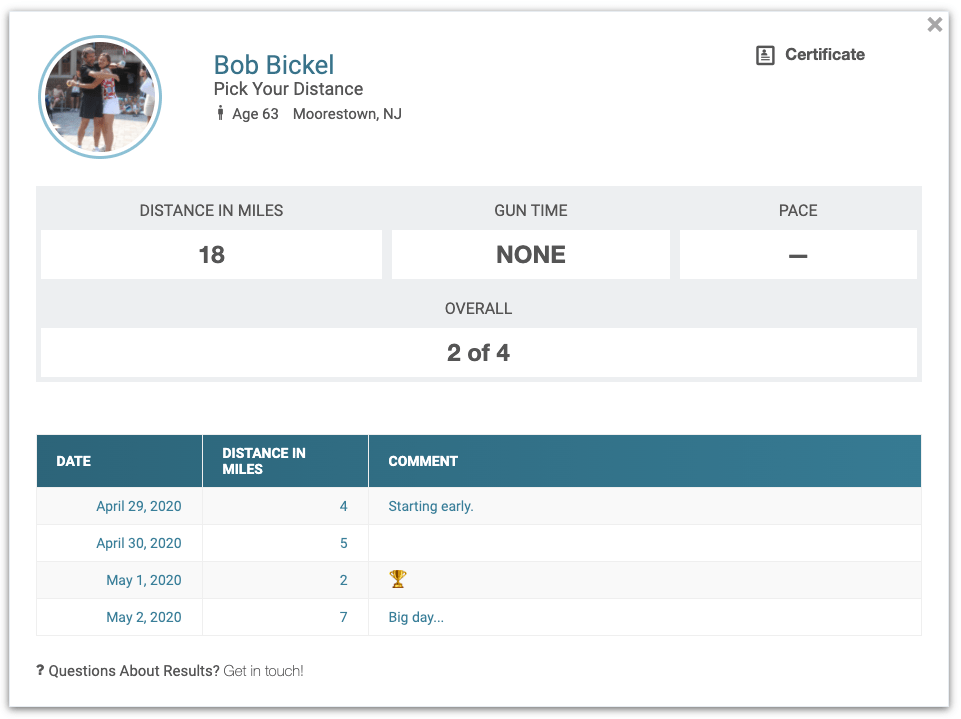
Over the next two weeks, we will be working to add Goal and Map capabilities, among other features, but this is what the individual result page looks like today:

Race Director Setup
Setup is a bit complex today, but will also improve significantly over the coming two weeks. First, you must enable Virtual Results in your race dashboard (RaceDay Tools >> Enhanced Virtual Race >> Setup Virtual Race >> Request Virtual Features).


On that page, you will add a Result Set:


To allow participants to enter their times, uncheck the box on the bottom.
To be able to accumulate activities (for example, add up miles or pushups over several days), you have to enable the “Tally”.


The type of Activity to Tally is flexible.


Now Available!
Stage one, including the challenge submission shown above, is now available and you can allow participants to start entering their information. The results and capabilities will expand over the coming two weeks to include goals, progress bars and maps, team totals as well as a few more nice little features. We have a ton of customer interest in this feature, and are looking at continuing to expand the capabilities to help more of our customers.