


One of the reasons we have grown so fast is that our system appeals to race directors because it let’s participants self-manage their teams. For example, our system allows runners in a relay to sign up at separate times and the race director does not have to get involved. Here were the top things we were trying to achieve with this new release:
- Flexibility to meet any type of group, team, relay needs races have.
- Simplify the Team Creation and Joining process.
- More Social. Teams are driving a lot of the “viral marketing” of a lot of races.
- Incentivize Teams. Have teams get something in return for reaching larger sizes!
We will walk thru the Runner views first, and then the Race Director Dashboard for setting things up. Note this is in addition to all the capabilities in Corporate and Sponsor Teams.

Name it Yourself
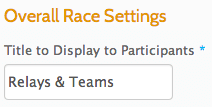
The first capability you should notice is that you can call it whatever you like! Competitive Teams, Relays, Triathlon Relay, Fun Groups. In the example we will go thru, this race has both Relays as well as a Team competition. This name will appear on the Tabs and elsewhere in the UI so that runners do not get confused about the purpose of teams or groups in your race.

Creating and joining teams is now done on the first page of registration. Fewer steps and less confusion. The details of creating or joining teams is now done in a pop-up. This works great on mobile devices and keeps the participant focused on what they need to do. The Orange toggle switch at the top is familiar to mobile users (Join/Create) and the drop down menus are simple. You can have custom text depending on each team type to help guide users on what this team type is meant to do. The system also automatically shows the “rules” set for the team type like min/max number of participants, whether there are age or gender requirements, etc. The system also automatically checks that those requirements are met for each participant signing up for a team.

Team Page

Social Virality with Group Incentives
Teams offer a way for races to to encourage runners to get their friends and families involved. RunSignUp offers several ways to offer group/team discounts. For example, you can set a $5 discount for everyone on teams over 10 people. RunSignUp will auto-refund the first 9 folks who registered once that 10th person registers.
Race Director Dashboard


Note there are a number of other options that can be set. In the next example on the right, we are setting up a team with 5 members on each team. We are also setting up separate teams for boys and for girls, and we are limiting age restrictions.
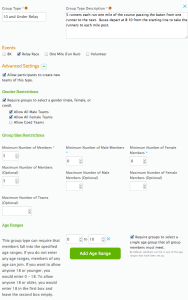

From a participant perspective, all of these rules will be enforced, so the system checks birthday and makes sure everyone on this team will be 10 or under on the day of the race.
There are a large number of options:
- Any combination of male, female and co-ed only teams
- Min and Max Male participants
- Min and Max Female participants
- Max number of teams
- Age Groups
- Restricted to one event or multiple events
Example Uses
There are a variety of ways this new team system can be used. Here are some examples:
- Triathlon Relays requiring at least female member
- FunRun that wants to have teams of at least 10 people running together as a Centipede
- Kids Relays
And all the great former features are still there. Participants can still sign up separately from each other and have full management capabilities to see who joins their team, trade Captains, have multiple Captains, remove people who have joined a team, etc. And it is all done with new, fresh, easier to use pages.
Team Participant Video:

Race Director Team Video:
